Payment Gateway

Redesigned an outdated mobile payment gateway flow by incorporating updated brand guidelines, aligning with modern UX/UI trends, and addressing user feedback to improve usability, security, and the overall transaction experience.

Role

UX Designer

Employer

Platform

Mobile

Industry

Financial Services
Background

The existing payment gateway flow had become outdated, both visually and functionally. As part of a broader product update, the goal was to modernize the mobile experience by aligning it with new brand guidelines and addressing critical usability pain points reported by users.


Part of the challenge was to elevate and clarify the user experience while maintaining structural familiarity, ensuring merchants and consumers could adapt easily without significant changes to their cognitive flow.

Problem Space

The checkout experience in traditional or outdated payment gateways is often high-friction, causing anxiety and leading to cart abandonment.


Users face challenges such as:

  • Scattered or unclear payment method selection

  • Intimidating forms with confusing input validation

  • Lack of real-time error handling and descriptive feedback

  • Anxiety around transaction security and data privacy

  • Rigid step-by-step processes that don't accommodate quick corrections

  • Poor visibility of order totals and breakdowns during the payment step


These pain points directly impact conversion rates and diminish user trust in the merchant's checkout ecosystem.

Product Goals

Reduce Checkout Friction

(Old-Left vs New-Right Designs)

Minimize cognitive load by simplifying input fields, clarifying layout hierarchy, and accelerating the path to transaction completion.

Build User Trust & Confidence

Introduce clear security indicators and professional design consistency to ease payment anxiety and reduce drop-offs.

Improve Feedback & Error Handling

Improve Feedback & Error Handling


Provide instant, non-intrusive, and highly descriptive validation to help users fix errors immediately without resetting fields.

Create a Scalable Component Architecture

(Old-Left vs New-Right Designs)

Design modular payment fields and layout systems that support future payment methods, regional compliance needs, and brand updates.

Research & Discovery

To modernize the payment flow while keeping the layout familiar and intuitive, the redesign strategy relied on:

Heuristic Evaluations

Analyzed the legacy flow against usability heuristics to pinpoint exact spots where validation and clarity failed.

User Feedback & Support Audits

Evaluated existing customer support tickets and user complaints regarding failed transactions and checkout confusion.

Competitive Benchmarking

Studied industry-leading mobile payment patterns to understand how users expect cards, digital wallets, and authentication steps to behave.

User Feedback & Support Audits

Evaluated existing customer support tickets and user complaints regarding failed transactions and checkout confusion.

Heuristic Evaluations

Analyzed the legacy flow against usability heuristics to pinpoint exact spots where validation and clarity failed.

Competitive Benchmarking

Studied industry-leading mobile payment patterns to understand how users expect cards, digital wallets, and authentication steps to behave.

Key Insights

Security Validation is Non-Negotiable

Users need constant reassurance. Small visual changes; like clear badge indicators, explicit button states, and trust icons, significantly increase user confidence.
Design Principle:

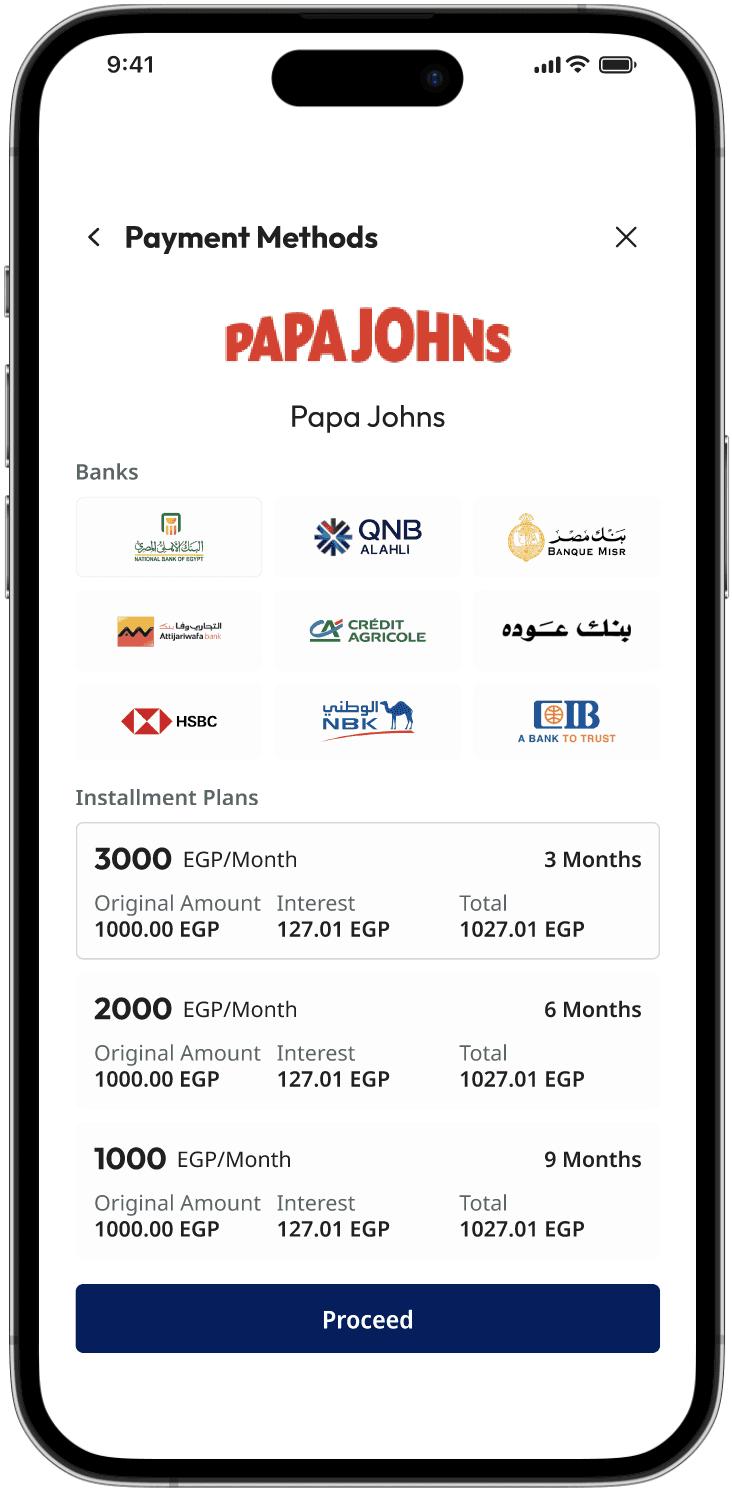
By consolidating the hidden data into a structured, side-by-side or immediate feedback layout, you eliminated the secondary steps of digging for information. This reduces the time and mental effort required for the user to evaluate their financial commitment and make a confident decision.

BeforeUsers had to navigate back and forth between different screens or menus just to compare installment plans for each bank, causing high cognitive load and friction.

After: The new design delivers instant visual feedback upon selecting a bank, displaying all critical decision-making details, such as installment durations, original prices, monthly breakdowns, and final totals, clearly on a single screen.

Input Clarity Drives Conversions

Vague error messages or resetting forms upon a single mistake create immense frustration. Real-time field formatting (like auto-spacing credit card numbers) drastically decreases typing errors.
Design Principle:

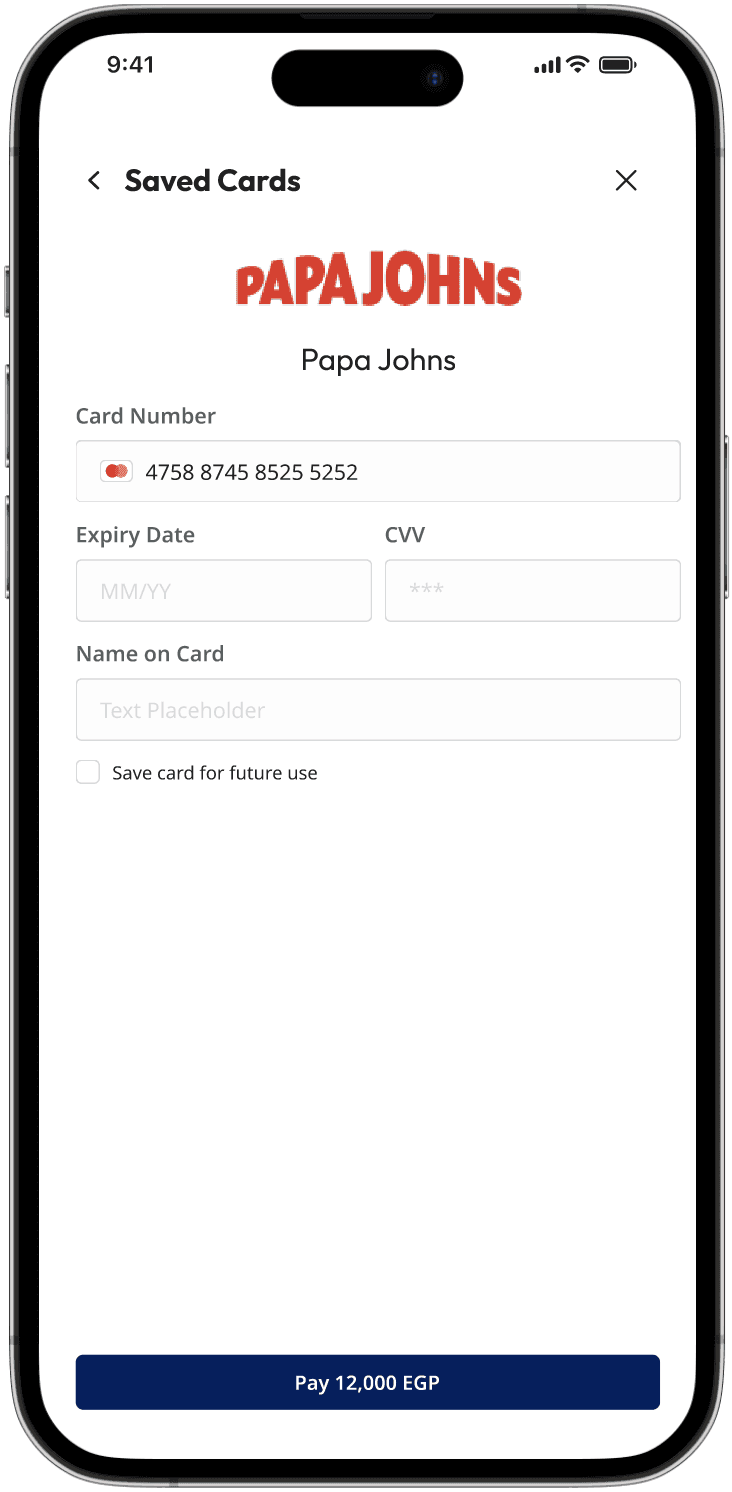
Saving a card while requiring a quick CVV entry for confirmation is the global standard for modern e-commerce (e.g., Apple Pay, Amazon, Stripe). By aligning your gateway with this deeply ingrained mental model, users instantly understand how to interact with the screen without needing instruction.

Before: The legacy gateway lacked any payment history or card-saving capabilities. Users were forced to manually re-enter their full card details for every single transaction, creating immense repetition and slowing down the checkout process.

After: Introduced a secure card tokenization system that safely stores user cards for future use. To balance speed with security, users can easily select or manage their saved cards but are required to enter their CVV for every transaction to verify identity and maintain compliance.

Familiarity Trumps Reinvention

When dealing with finances, users prefer predictable patterns. Elevating the interface required refinement rather than an overhaul of standard mental models.

Design Principle:

By wrapping an already efficient workflow in a polished, modern visual system, you increase user satisfaction, brand credibility, and perceived trust. Users are more likely to have patience with and confidence in a financial platform that looks premium and professional, even if the underlying mechanics remain identical.

Before: The legacy interface felt outdated and visually fatigued, lacking alignment with modern design systems and the updated brand identity. However, user research indicated that the underlying operational workflow itself was frictionless and highly intuitive.

After: Intentionally preserved the exact core workflow and structural steps that users were already comfortable with. Instead of introducing disruptive functional changes, the focus was strictly on elevating the look and feel, refreshing typography, spacing, and visual hierarchy, to modernize the brand identity while honoring the user's established habits.

User Journey

User Journey

Screen 1: The Gateway Hub (Main Navigation Page)

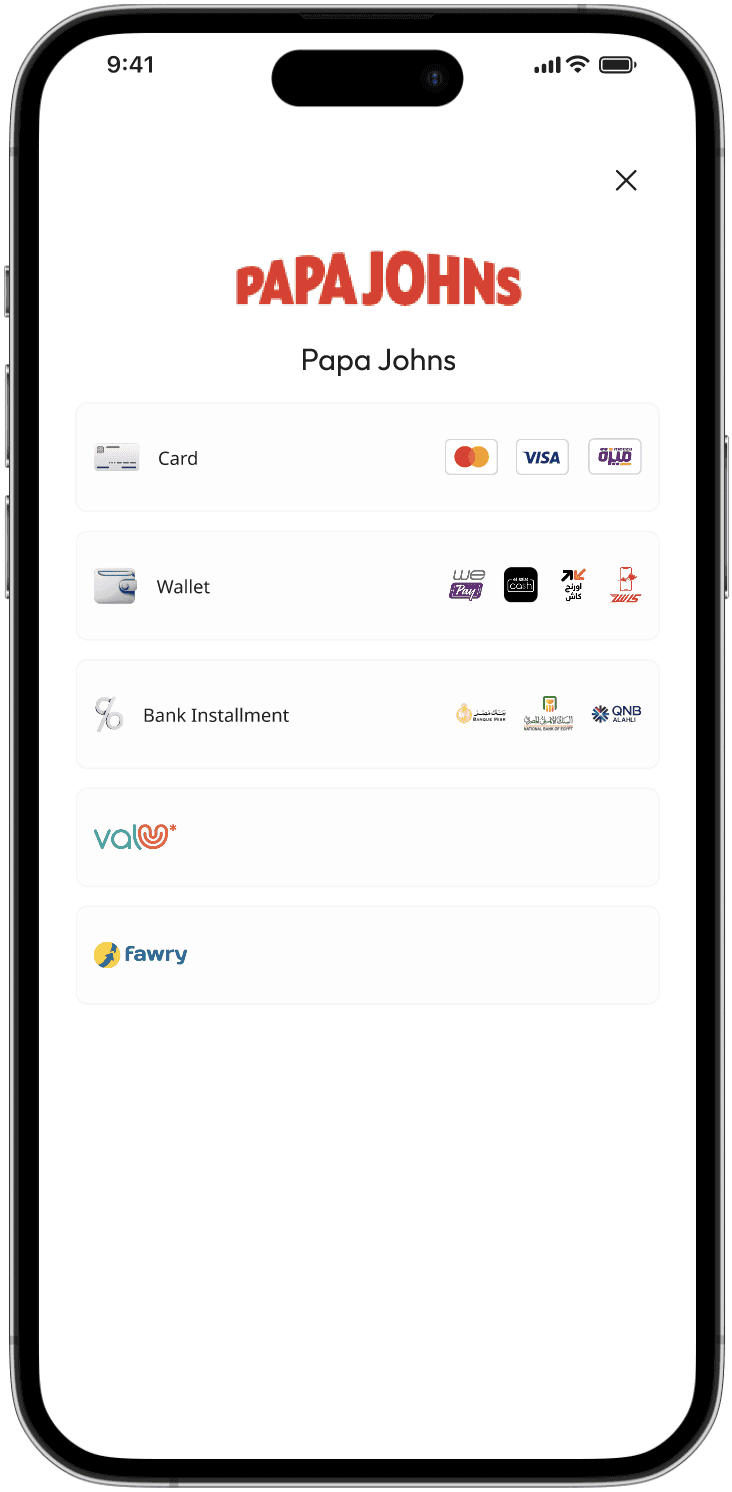
This is the entry point of the checkout experience where all available payment rails are consolidated into a single unified dashboard.

Payment methods are structured as clean, uniform tap targets with recognizable brand logos. This allows the user's eye to quickly scan and identify their preferred payment vehicle without textual clutter.

The interface dynamically surfaces the specific card network icon (Visa, Mastercard, Amex) the moment the first few digits are typed, offering instant visual verification.

For returning profiles, the UI masks the saved card digits and shifts the primary input focus exclusively to the CVV field, acting as a massive conversion accelerator while maintaining security boundaries.

Screen 2: Card Payment Flow

Selected when a user opts for traditional Credit, Debit, or Saved Cards.

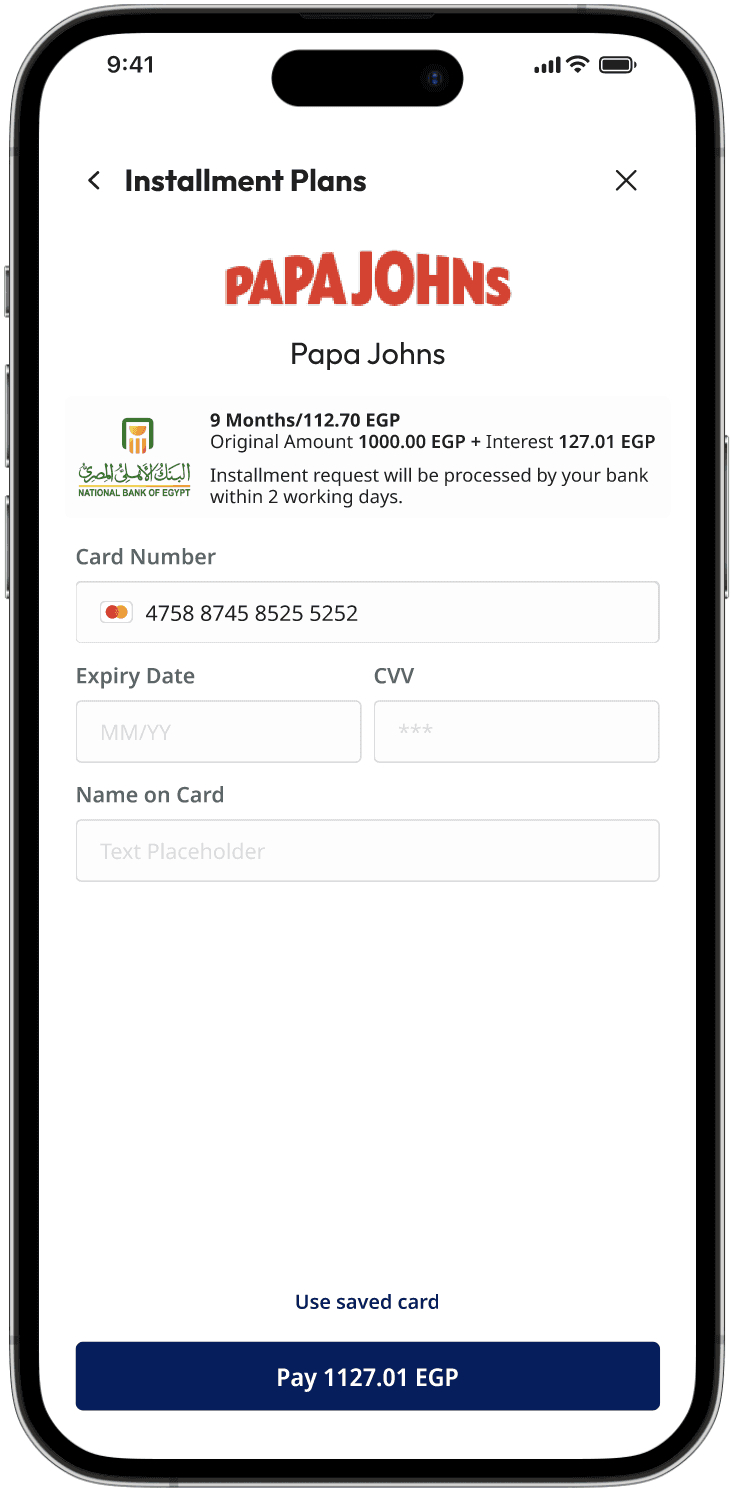
Eliminates the old back-and-forth friction by displaying interest rates, monthly breakdowns, plan durations, and final totals instantly upon selecting an affiliated bank.

Plans are laid out in a scannable grid rather than buried in dropdown menus, allowing users to effortlessly weigh their monthly budgeting options side-by-side.

Screen 3: Installments Flow

Selected when a user wants to split their payment across affiliated banking partners.

Screen 5: ValU Premium Service Flow

Selected for users utilizing the BNPL (Buy Now, Pay Later) fintech platform.

The UI clearly communicates a temporary hand-off (e.g., "You will be redirected to verify your wallet"), setting clear expectations

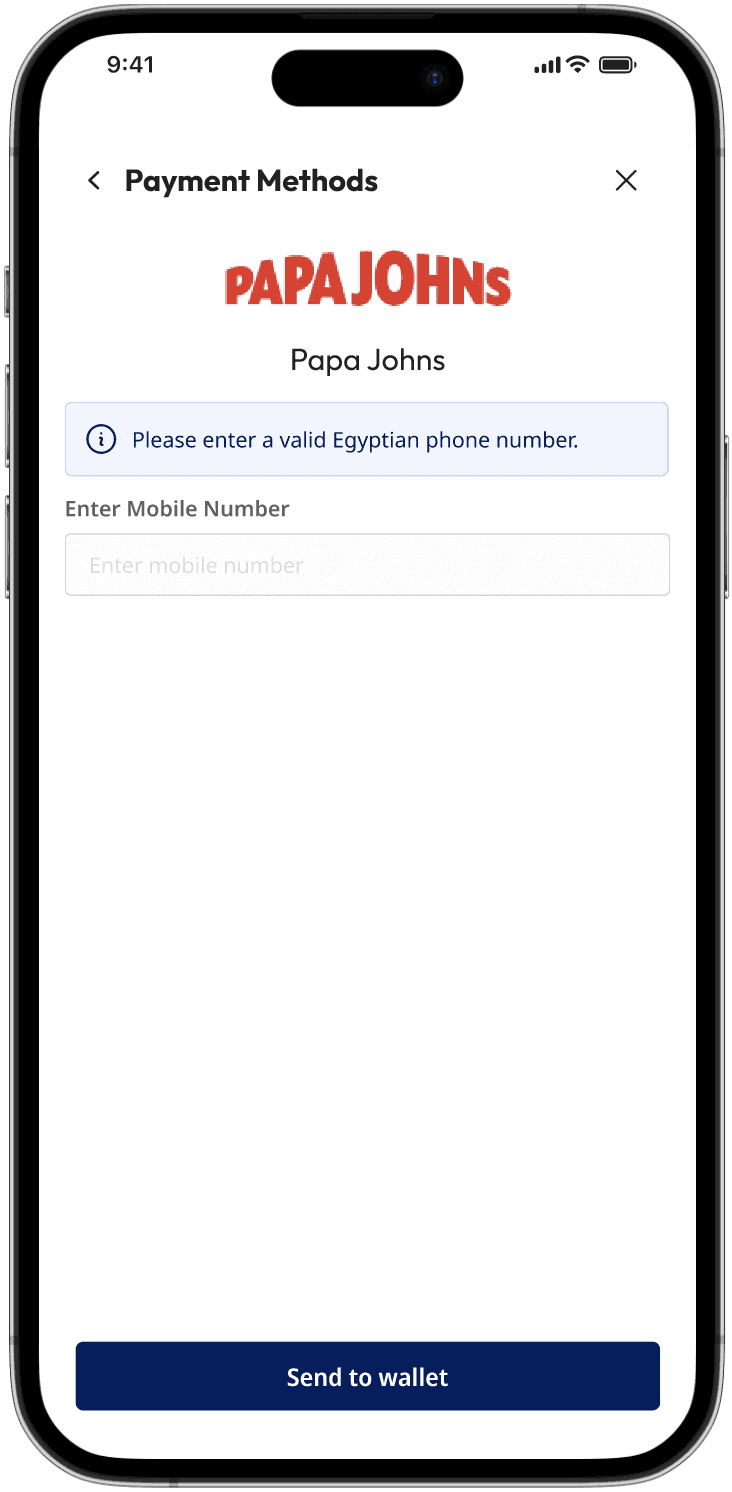
Only the essential identifier (mobile number) is requested, lowering the barrier to entry to the absolute minimum.

Screen 4: Digital Wallet Flow

Selected for rapid mobile checkouts via local or global digital wallets.

Integrates a dedicated field for the user’s registered mobile number linked to their ValU account, seamlessly mirroring the native app's verification ecosystem.

Plans are laid out in a scannable grid rather than buried in dropdown menus, with all respective service inputs keeping the checkout loop tight and secure without pushing the user out of the platform.

Get in

Touch!

Get in

Touch!

Back to Top

Create a free website with Framer, the website builder loved by startups, designers and agencies.